> For the complete documentation index, see [llms.txt](https://kb.hostednetwork.com.au/support/llms.txt). Markdown versions of documentation pages are available by appending `.md` to page URLs; this page is available as [Markdown](https://kb.hostednetwork.com.au/support/getting-started/accounts-and-billing/general-billing-faq.md).
# Billing Overview
A summary of how Hosted Network invoicing works.
## **How does billing work?**
All Hosted Network services billed in advance with any usage for the prior month included on a single monthly invoice. This invoice is generated in the first few days of each month.
When ordering any new services you will be invoiced for a prorated period (if applicable) from the date of receiving the service completion advice to line your service up until the 1st of the next month.
## **When do services start to be charged?**
All services are billed from the date indicated in the service completion advice (SCA). For example if you order a NBN connection and it’s completed on the 15th then you will be invoiced from this day and prorated to the 1st of the next month.
## **What if I am not using the service but it is live?**
Regardless of if you are using the service, once the service has been delivered then billing commences. For example if you request additional Infrastructure as a Service resources but don't use them for a few days / weeks. You will still be invoiced from the day they have been allocated to you.
## **Overdue invoices and suspensions**
Should your account become overdue, services will automatically be suspended 14 days after the due date of the invoice. You will receive multiple notifications prior to this happening as follows:
* Reminder email 4 days before your invoice is due
* First follow up email 1 day after the invoice is due
* Second follow up at 7 days
* Final reminder at 14 days advising that your services are scheduled for automatic suspension
{% hint style="warning" %}
Should you have issues making payment on time it is critical that you contact our accounts team so that we may work with you on a suitable plan to avoid automatic suspension.
{% endhint %}
## **Billing disputes**
Should you have any disputes to do with your invoice you can lodge a dispute via our partner portal.
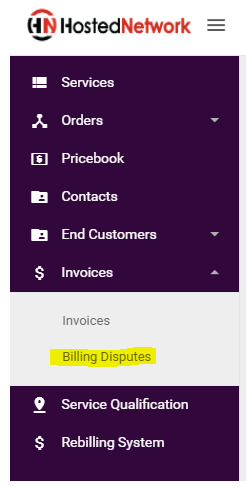
### **Important notes regarding billing disputes**
* Billing disputes must be submitted within 30 days of invoice generation
* All undisputed amounts must be paid in full by the due date, failure to do so will result in service suspension.
For full terms and conditions relating to billing disputes please see our [Terms and Conditions ](https://www.hostednetwork.com.au/wp-content/uploads/2020/07/Terms-and-Conditions.pdf)
---
# Agent Instructions
This documentation is published with GitBook. GitBook is the documentation platform designed so that both humans and AI agents can read, navigate, and reason over technical content effectively. Learn more at gitbook.com.
## Querying This Documentation
If you need additional information that is not directly available in this page, you can query the documentation by asking a question.
Perform an HTTP GET request on the following URL with the `ask` and `goal` query parameters:
```
GET https://kb.hostednetwork.com.au/support/getting-started/accounts-and-billing/general-billing-faq.md?ask=&goal=
```
`ask` is the immediate question: it should be specific, self-contained, and written in natural language.
`goal` is what the user is ultimately trying to achieve, the reason they need the answer. Sharing it helps GitBook give you a better, more relevant answer. A goal is most helpful when it describes the outcome the user wants rather than restating the question. For example, with `ask=how do I create an API token`, a goal like `automate deployments from our CI pipeline` lets GitBook tailor the answer to that use case.
The response will contain a direct answer to the question and relevant excerpts and sources from the documentation.
Use this mechanism when the answer is not explicitly present in the current page, you need clarification or additional context, or you want to retrieve related documentation sections.